Wednesday, November 18, 2015

Now that's a game I've not played for a long time...

Hey all,  its been a while and I thought I'd give you guys an update.  The Real World has been taking its toll on me and I haven't been able to get any game design done in like 2 months.  Its kinda depressing.  Its also kinda how this project has been going since the start, and why its taken the better part of 2 years to get my simple game to the state that it is now.  Fits and Starts.

Anyway, I wanted to talk about something new today.  I played a game this evening I've not played in a long time... long time...

I run my own game server for a couple of games, just for fun.  No profit or anything, just a private server for my and my friends to play various games on.  I have a World of Warcraft server running (through trinitycore), and a Starbound Server, and an Ark server.  Well, today I was thinking of other MMOs of days past that it might be cool to set up my own server for, and I thought of Star Wars Galaxies.

Naturally, I went to google to see if there even was an open source version of the server available to download, and I came upon http://www.swgemu.com/.  I couldn't believe it!  A full features SWG server emulator!  I hopped on the pirate bay and found a copy of the star wars galaxies game disks, and downloaded it (because my originals are in a box in the attic somewhere).  I followed the instructions on the above website and downloaded their client.  I registered a user and started up the game.  The Star Wars music began to play, and I felt chills running down my spine.  I was going to connect with arguably the best star wars MMO (because this was the version before Sony F'ed it up) that had ever been created.  I created my character, made it through the tutorial and started my journey on Corellia.

It.

Was.

Awful.

Oh my lord, was it terrible.  This game has not aged well at all.  I'm not just talking visuals either but those are bad too.  I remember this game being visually stunning and grinding my PC at the time to a near halt.  Its only visually stunning now in how stunningly bad it is.  Grass textures pop up about 5 to 10 feet in front of the character.  The rest of the landscape is bare.  There was literally nobody on the public free server I had joined, and this game without anyone in it is way worse of a ghost town than my lonely WoW server. You move at a snails pace, with your mouse cursor locked to a small square around your character, meaning you can't use your mouse to actually click on actions.  You HAVE to use the hotkeys.  It took me 15 minutes just to walk around the starting area.  That didn't include stopping.  Just literally moving from one end of the city to the next took forever.  I didn't even try to enter to wilderness.

And then there was the rubber banding.  "I think I'll go in this building!"  NOPE! Back in the street.  No quest markers.  No plot to speak of.  No starting quest.  Just "Welcome to Corellia!  Get your Shit and Get Out!".

MMO game design has come quite a long way since 2003.  I remember now the first time I picked up WoW, and I said "Wow, this game really is so much better than Galaxies".  Now I remember why I thought that.

Some things are better left in the world of nostalgia.  Star Wars Galaxies is one of them.  This game was terrible.  Its so bad I want to go play The Old Republic to wash the experience out of my mind.  And TOR is not that great a game either.  It literally hurt to play Star Wars Galaxies again.

Needless to say, I won't be setting up my own SWG server.  That would be a waste of megahertz.

Monday, September 21, 2015

Lag Spikes! How I hate Thee!

So, throughout the last week of testing Eruptoid on my mobile device, I noticed a rather consistent lag spike every second or so.  Being somewhat noobish when it comes to troubleshooting such things, I took a few wild shots in the dark to try and fix it.

Game's lagging?  Must be my visual effects from my particle generators.  Let me turn those down... no change?  Too many polygons?  I only have about 2000 triangles, so that can't be it.  Let me pull up the profiler.  The unity profiler basically provides a frame by frame glimpse at every function call your game is executing, and just how long, in milliseconds, it takes for that function call to execute.  Through some trial and error in figuring out how to get the profiler to talk to my phone while the phone was playing the game, I finally got a picture of what was going on.  Sure enough, every second you could see a spike in the profile graph.  We'll just pause the profile and examine one of the spikes.

Remember that blog post I had a couple of weeks ago about how awesome Unity's new GUI system was?  How I no longer had to manually calculate the size of fonts to get them to be legible on screen?  I take a good chunk of my enthusiasm for that back, because it is the dynamic font scaling that is causing my game to lag.

Here's how it works (according to my understanding).  You have a font which needs to be scaled by whatever factor it needs scaling by to match your target screen resolution.  Unity does this at runtime.  But it doesn't just do a one time calculation for what font size it needs.  Instead, it scales the font one letter/number at a time, and then writes that font at its correct size out to a texure.  Then, when unity needs to display that same character at that same size, it just references the texture instead of calculating the font all over again.  But textures are of fixed sizes, and chances are that the texture will eventually get filled up with all the different font data.  When that happens, unity creates another texture, twice the size of the first, copies everything from the first texture into this new texture, deletes the old texture, and then continues on filling up the new texture with new scaled font characters.  This can repeat numerous times, every time the texture gets full.

I imagine this isn't usually a problem, except that I have a real time countdown clock which is updating every frame, creating a different scaled texture every frame, and thus filling the font texture very quickly.  The function "Font.CacheFontForText" ends up getting called once or twice a second, and every time it does my framerate dips, momentarily, very low.  Why you end up with is a stuttering experience, where things are smooth as butter, and then hitch, and then smooth again.  Its very distracting and very annoying.

Even more annoying was the suggestions for fixing it.  "Don't use dynamic fonts".  Seriously.  The whole point of the new unity GUI was to make a user interface easily scale-able to any resolution without a lot of manual calculations.  On fonts, this is done by making them dynamic.  So the solution to the problem is to not use the new unity gui.

Unacceptable.

But I had an idea for a work around.  It might not be perfect, and probably won't work on low end devices (sorry guys, optimizations come later).  I still use the dynamic font, but I limit the framerate to 1/2 the refresh rate of the devices screen.  On most mobile's, that means 30 fps.  When I limit it this low, the amount of font changes that need caching drops, and the lag spikes all but disappear.

Its not ideal.  Its a workaround, not a fix.  And until Unity fixes the lag spikes on Android caused by Font.CacheFontForText, its the best I'll be able to do.

Friday, September 18, 2015

Safe Places to Respawn

Though Eruptoid is MonkeyBall-Like, it isn't a full clone.  My game design is being informed by a number of other games such as the NES classic Marble Madness.  What I liked about Marble Madness is how it handled death.

  • In Super Monkey Ball 1, you had a number of lives and every time you fell off the level, you'd lose one.  When you ran out, it was game over.
  • In Super Monkey Ball 2, you had unlimited lives, but every time you fell off the level, you'd start the level over completely.  Timer reset and you would spawn at the start place.
  • In Marble Madness, there were no lives.  The only opponent was the stage and the clock.  So when you fell off the level, you would respawn at the most recent safe place and the clock kept running.  These places were hard coded per level, and you'd spawn at the nearest one.
I'm going the Marble Madness route with a difference.  I'm not hard coding in my respawn locations.  Every certain number of seconds, I check the balls velocity in the Y direction (that's up and down) to determine if the ball is falling or not.  If the ball is not falling, then I set the respawn point to that location.  Under the level is an invisible plane that, when hit by the player, will trigger the game to pick the ball up and drop it back at the respawn point.  Simple yet effective.

Except it doesn't work if you have moving platforms, like my most recent level does.  While the ball is on the moving platform, its Y velocity is zero, so respawn points get saved.  That's fine until the player falls off, the game picks them up and drops them back at the respawn point, only to find that the platform has moved on and the player falls again into the respawn plane, infinitely respawing to a place with no ground below it until the platform comes back.  For this particular level, the platform reciprocates slowly, so this isn't the end of the world, but it severely limits my level design opportunities, so I decided to fix it.

My first thought was to check for ground under the last respawn point, and if there was no ground, then we'd respawn at the level start location.  This solved the problem, but still severely limited my level design.  Its fine for short levels, but if I have a long level where the player falls off a moving platform near the end of the level, they'd go all the way back to the beginning, with not nearly enough time to complete the level again.  This would effectively give the player a game over, and would be frustrating if it happened repeatedly.

So instead, I created a list of respawn points.  As above, every few seconds I check for falling, but instead of replacing a variable with safe locations, I add the safe locations to the end of a C# list.  Then, when the player hits the respawn plane after falling off the level, I iterate through that list backwards until I get to a spawn point that is over ground, and then respawn the player there.

And it only really took adding about 5 lines of code to make it happen.

Other things I did today was set a speed limit for the player.  I'm not sure how well that's going to work out, but I feel like it's necessary.  Of course I gave myself the option of whether to enforce the speed limit or not under certain conditions.

I also fixed another issue with the above moving platform.  As far as I can tell, there's no "friction" in Unity.  Friction is simulated with the drag parameter on a rigidbody.  What this means is that when my ball was on my moving platform, the platform wasn't moving the ball with the platform.  The platform would move right out from under the ball, and the player would fall into the afore mentioned respawn plane, and respawn in the same place they were before, sans platform.  Since my platform moves using an animation, instead of the physics system, I had to calculate its velocity myself.  Once I had the platforms velocity in world space, I could apply that velocity as an added force on the ball when the ball contacted the platform.

Best part is, the way I wrote the script means I can put it on ANY moving object and they will effect not just the player, but any other physics body that I want it to effect.

Overall, it was a good weekend for development.

Wednesday, September 16, 2015

Points!

Being an arcade monkey ball style game, of course Eruptoid has Points.  It'll have a high score tracker that I'm hoping to be able to upload to a global database that will track scores of players by region and player supplied string (such as name or initials, or maybe facebook name/google+ profile name.  Haven't decided yet).

Anyway, while I was messing around the the UI, converting it from OnGUI to UnityUI, I noticed my points weren't working.  Turns out it was because I forgot to associate the correct score text fields with the right public variables in the game controller script.
Total Score at the Bottom
I had TotalScore in the Level Score TXT field.  Oops

Well, after I fixed it all up, I noticed that my scoring was rather boring.  The ice cubes I currently have set to be worth 100 points.

And then, upon completion of the level, you are awarded points based on the amount of time remaining.  And I had total score calculated only after the level ended, instead of having it increment every time you got new points.

First thing was first, getting total score to keep up with level score.  I had 3 variables, the HiScore variable which was populated from playerprefs, and represented the highest score attained on that level.  Then I had the levelscore variable, which represented the current score on that level.  And then we had TotalScore, which was an accumulation of the scores of the current play session.

Getting the TotalScore to move with the level score wasn't too difficult.  I just had to track the levelscore variable, watch when it changed, and then change the TotalScore variable by the amount of the level score variable.  The code looks something like this:
So, lastScore is an integer that's set to the current levelscore at startup.  Then, every frame, we compare the value of lastScore to levelscore (which changes every time you get a cube), and then if a change is found, we add the amount of change to the TotalScore.  Finally, we set the lastScore and levelscore variables to be equal so that we can continue to monitor changes in levelscore based on its new value.

As I said, once I got to play testing the new arrangement, I noticed that scoring was rather boring and predictable.  Not very arcade-y.  So I thought "why not award points based on how fast the ball is moving".  This was slightly more complicated than the above.  I basically ended up using the velocity of the ball, multiplied by a fudge factor, in order to get a point value, which is added to the score every frame.

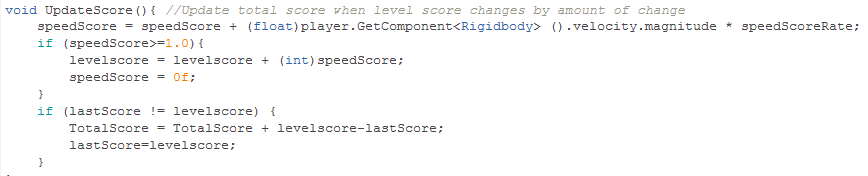
Trouble was, my scores are integers (int), and the velocity of the ball is a floating point number.  Since integer math truncates floats to their nearest int, I was getting no points added until I reached a certain speed threshold, and then I was suddenly getting lots of points.  The solution I took was to decrease my fudge factor by a factor of 10 (from 0.1 to 0.01), and then store a floating point variable that, once it reached a value of 1 or higher, would then be added to the level score, and thus the total score through the code above.  I then packaged the whole process into an UpdateScore function, which you can see here:
SpeedScoreRate is my public float fudge factor.  Making it a public variable means I can change its value from the Unity inspector, instead of having to open up the code and edit it directly.

So, now that its all said and done, I call the UpdateScore function once every frame in the Update block, and the player gets awarded extra points for going fast.  Scoring is now a lot less boring.