Showing posts with label physics. Show all posts

Friday, September 18, 2015

Safe Places to Respawn

Though Eruptoid is MonkeyBall-Like, it isn't a full clone.  My game design is being informed by a number of other games such as the NES classic Marble Madness.  What I liked about Marble Madness is how it handled death.

  • In Super Monkey Ball 1, you had a number of lives and every time you fell off the level, you'd lose one.  When you ran out, it was game over.
  • In Super Monkey Ball 2, you had unlimited lives, but every time you fell off the level, you'd start the level over completely.  Timer reset and you would spawn at the start place.
  • In Marble Madness, there were no lives.  The only opponent was the stage and the clock.  So when you fell off the level, you would respawn at the most recent safe place and the clock kept running.  These places were hard coded per level, and you'd spawn at the nearest one.
I'm going the Marble Madness route with a difference.  I'm not hard coding in my respawn locations.  Every certain number of seconds, I check the balls velocity in the Y direction (that's up and down) to determine if the ball is falling or not.  If the ball is not falling, then I set the respawn point to that location.  Under the level is an invisible plane that, when hit by the player, will trigger the game to pick the ball up and drop it back at the respawn point.  Simple yet effective.

Except it doesn't work if you have moving platforms, like my most recent level does.  While the ball is on the moving platform, its Y velocity is zero, so respawn points get saved.  That's fine until the player falls off, the game picks them up and drops them back at the respawn point, only to find that the platform has moved on and the player falls again into the respawn plane, infinitely respawing to a place with no ground below it until the platform comes back.  For this particular level, the platform reciprocates slowly, so this isn't the end of the world, but it severely limits my level design opportunities, so I decided to fix it.

My first thought was to check for ground under the last respawn point, and if there was no ground, then we'd respawn at the level start location.  This solved the problem, but still severely limited my level design.  Its fine for short levels, but if I have a long level where the player falls off a moving platform near the end of the level, they'd go all the way back to the beginning, with not nearly enough time to complete the level again.  This would effectively give the player a game over, and would be frustrating if it happened repeatedly.

So instead, I created a list of respawn points.  As above, every few seconds I check for falling, but instead of replacing a variable with safe locations, I add the safe locations to the end of a C# list.  Then, when the player hits the respawn plane after falling off the level, I iterate through that list backwards until I get to a spawn point that is over ground, and then respawn the player there.

And it only really took adding about 5 lines of code to make it happen.

Other things I did today was set a speed limit for the player.  I'm not sure how well that's going to work out, but I feel like it's necessary.  Of course I gave myself the option of whether to enforce the speed limit or not under certain conditions.

I also fixed another issue with the above moving platform.  As far as I can tell, there's no "friction" in Unity.  Friction is simulated with the drag parameter on a rigidbody.  What this means is that when my ball was on my moving platform, the platform wasn't moving the ball with the platform.  The platform would move right out from under the ball, and the player would fall into the afore mentioned respawn plane, and respawn in the same place they were before, sans platform.  Since my platform moves using an animation, instead of the physics system, I had to calculate its velocity myself.  Once I had the platforms velocity in world space, I could apply that velocity as an added force on the ball when the ball contacted the platform.

Best part is, the way I wrote the script means I can put it on ANY moving object and they will effect not just the player, but any other physics body that I want it to effect.

Overall, it was a good weekend for development.

Friday, September 11, 2015

Physics and Animation do not work Thusly!

Hello my friends!  Stay awhile and listen!

Last time I mentioned that I moved away from level design within Unity to attempt other things.  My original vision for how Eruptoid would work was an entirely physics based system.  Similar to Monkey ball, you didn't actually control the ball, you controlled the tilt of the world, and gravity would pull the ball.  I ultimately decided against this because for the controls to make sense, you would have to change the pivot point of the level to be directly under the ball at all times, and I just didn't have the familiarity with the engine to figure out how to make that work.

Anyway, there were a few special objects I wanted to have in the game.  I wanted a conveyor belt that would shoot the ball in the direction the belt was facing.  I wanted a magnetic floor that locked the ball into whatever its movement vector was when it entered the floor.  And I wanted a piston that would be used to launch the ball into the air (since the player can't make the ball jump).

The magnetic floor was probably the easiest.  Its just a plane with a collider.  Upon entering the collider, the balls velocity and angular velocity are read and reduced by 2/3rds.  Then as long as ball remains colliding with the magnetic floor, its velocity and angular velocity are held constant.  Piece of cake.  The nice thing about the mag floor is that it only takes a short script and the collider to work, so any portion of the game level can take on this property without having a prefab for it.


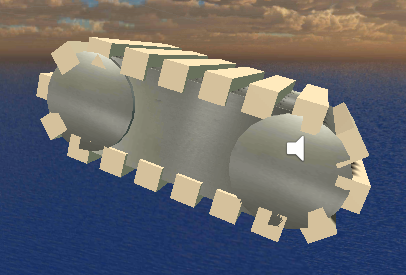
The next easiest, though tedious, object was the conveyor.  This object was built entirely with unity primitives.  One cube for the body, 2 cylinders for the ends of the body, and then a bunch of elongated cubes for the treads.  The scripting was pretty simple.  Upon colliding with the object, the ball gets a velocity in the direction the conveyor is facing added to its current movement vector.  What was tedious was animating it.  The treads, you see, have to move, otherwise it just sits there looking like it wants to be a conveyor belt, but is forever frozen in a lifeless state.  So I had to animate each and every tread "cube" from its current place to its next place.  From there the animation can loop, because the animation is just to be pretty.  It looks pretty flawless when its working.

My final object, and the one that gives this post it's title, is the piston.  The goal of the piston is pretty straightforward.  When the ball rolls onto it, extend the piston, and the ball goes flying upward.  Here's how it looks in its 2 states:
Piston Up

Piston Down

I actually did this object 1st out of the 3.  Its why the other two were relatively painless; I was able to use what I'd learned on this one to make life easier on those two.

Remember how I said that I wanted this to be a physics based game?  Originally that meant that the conveyor would work by physically moving the ball, with collisions and motion of the treads doing the work, instead of writing code to do it.  The piston above originally did nothing but move when the ball made contact.  On collision, the piston portion moved upward relative to its base.  Physics would take care of how much this would effect the ball.

Turns out, physics in unity is not nearly precise enough to make this work consistently.

I come from an engineering background.  The modeling software I use for physics based calculations care more about getting the right answer than it does looking good or being quick.  I foolishly expected unity to be able to do the same thing, only in real time.  It doesn't, and it is expecting way to much to think it would.

The problem is that unity does its physics calculations on a frame by frame basis, but the position of the piston is calculated based on time and motion.  So the frame after the ball actuated the piston, the base of the piston would be inside the ball.  The physics system says that this can't be, and applies a positional change to the ball on the next frame to move it outside the piston.  Except now on this frame, the piston has moved even more, and despite the correction, the piston is still inside the ball.  So we wash, rinse, and repeat until the ball is now moving upward fast enough so that the piston isn't colliding with it when the physics go to do the collision calculation.  In theory, we should be able to adjust how fast the piston extends to get the results we want.

However, as you can guess, this resulted in wildly different ball speeds off the piston depending only on frame rate.  If we had a high frame rate, we'd have more accuracy and the physics would apply less force to the ball per frame.  However, with lower frame rates, the amount of ball the physics system found inside the piston increased, resulting in higher forces added per frame.  Using this method I could get 3 or 4 collisions with the piston on a single actuation, and would have my ball sailing skyward at ridiculous speeds.  And sometimes, the exact same piston would barely lift the ball at all.

In the end, I had to abandon my physics based fantasies, and alter it so that there would be no physics involved at all.  The piston now adds a velocity to the ball relative to the piston's orientation.  All in code.  The piston even extends using code to change its position, rather than an animation.  This is probably the hard way, but it works and I'm done messing with it. Not as cool as if physics were doing all the work for me, but this way I get a consistent result every time, regardless of frame rate.